
PDF Reader: Documents Master review
 Analysis by GetAllApps
I judge a PDF reader less by the first document it opens than by whether it still feels useful after the novelty wears off. PDF Reader: Documents Master has a clear, practical role: it is a free Tools app from Praya for opening and handling PDFs on a phone. That makes it worth considering if you often need to consult documents while away from a computer, though a reader’s everyday value depends heavily on how smoothly it fits into the routine you already have.
Useful from the first document
The appeal is easy to understand. PDFs are the format people reach for when a file needs to look consistent, whether it is a form, a set of instructions, a class handout, or a document sent for review. A dedicated PDF reader gives those files a clear place on a mobile device instead of making each one feel like an awkward attachment to deal with.
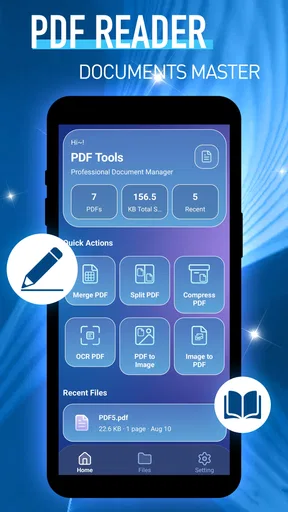
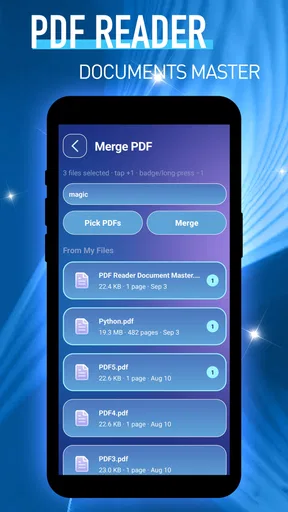
The app’s brief store description presents it as a way to handle documents with ease, but I would keep expectations grounded: its stated purpose is PDF reading, not a full office suite. If your immediate need is simply to open a document and read it on a phone, that focused role is a sensible starting point. If you expect editing, annotation, scanning, signing, or cloud collaboration, those are separate capabilities to check before making this your main document tool.
On a first day, I would try it with the kinds of PDFs that actually recur in your life rather than judging it on a single sample file. Open a short notice, then something longer, and see whether you can comfortably return to the right page after putting the phone down. A reader can be perfectly adequate for occasional files but frustrating for a long manual or a document you revisit throughout the week.
That small test also helps answer a practical question: should this replace the PDF viewer you already use? Not necessarily. Many phones already have a built-in viewer, and browsers or file-management apps may open PDFs without an extra step. A dedicated app earns its place if you prefer keeping document reading separate from browsing or want a familiar destination when you tap a file. If your current setup already handles that reliably, switching just for the sake of switching may add more friction than value.
Where it can fit into an ordinary week
Imagine receiving a building notice or appointment document while you are out. You can open the PDF on your phone, read the relevant details, and keep moving instead of waiting until you are back at a laptop. That is an unglamorous but real use case: the value is not a dramatic transformation, but having a dependable way to consult a fixed-layout document at the moment you need it.
Students and people who carry reference material may also appreciate having a reader available for notes distributed as PDFs or instructions they need to check between tasks. Still, the usefulness depends on the reading experience and on the habits around it. For a file you only view once, almost any built-in option may be enough. For a document you return to, convenient access and a reliable way to find your place matter more than a long list of features.
One useful habit is to open important files before you are in a hurry. Confirm that the right document is available on your device and that its text is readable at the screen size you have. That is especially sensible for travel instructions, a form you need to consult during an appointment, or a reference you expect to use away from a stable connection. I would not assume that any particular offline or syncing behavior works a certain way without checking it in the app.
Value after the first week
The first few openings are not enough to show whether an app deserves lasting space. I would judge this one by a simple monthly question: does it make PDFs easier to deal with often enough that I reach for it without thinking? A reader can become a useful utility precisely because it disappears into the routine. If it reliably opens the documents you receive and feels comfortable for the time you spend reading, that quiet consistency can be more valuable than flashy extras.
Its category is practical rather than entertaining, so recurring value will vary sharply by person. Someone who receives work forms, school materials, household instructions, or travel documents may have regular reasons to use it. Someone who rarely handles PDFs may find that the phone’s existing viewer covers every need. I would not install a second reader just because it sounds more organized; I would keep it only if it makes a repeated task noticeably simpler.
There is also a useful distinction between a reader and a document workflow. Opening a PDF is only one step if you need to fill in fields, add comments, sign, convert, or send a revised copy. For those jobs, a dedicated editor or a broader document app may be the better choice. Using a reader for reading and a specialized tool for changes can be a cleaner arrangement than expecting one lightweight app to handle every document task.
The app has an average rating of 3.9 from 674 ratings, with 127 written reviews, and has reached over 500,000 installs. Those figures suggest that it has found an audience, but they do not settle whether it will suit your habits. For me, the sensible takeaway is to evaluate the actual reading experience on your own files rather than treating popularity as proof that it is the right fit.
Keeping the document habit low-maintenance
A mobile reader can become annoying when it adds steps instead of removing them. The real test is what happens after you tap a PDF: can you get to the file you intended, read it without wrestling with the screen, and return to your other tasks? I would pay attention to that sequence before moving a large collection of documents into any new app.
A low-effort setup starts with a small trial. Use the reader for a handful of files you already need, and notice whether you can find them again later. If you are storing documents in several places, decide which location is your source of truth; otherwise, a second reader can create the impression of organization without actually making files easier to locate. This is a general workflow choice, not a special feature claim about the app.
Version 1.0.1 is the current version, and the app is listed for devices running Android 10 or later. The release date is September 4, 2026. That makes compatibility worth checking before installing, particularly if you keep an older phone in service. The app is free and rated for Everyone, which makes it straightforward to try, but free access alone is not a reason to keep an app you rarely use.
For upkeep, I would avoid turning a simple reader into another place where every file is duplicated. Keep important originals in the storage or service you already trust, and use the app as a way to read them. This makes it easier to change readers later if your needs shift and reduces the risk of confusing a viewing tool with a backup system.
What may wear thin
The main limitation to keep in mind is the narrowness of the stated role. A PDF reader is not automatically a PDF editor, scanner, or reliable filing system. If your daily work involves revising documents, inserting signatures, or moving files between colleagues, you should choose a tool that clearly supports those tasks instead of assuming the word “reader” covers them.
Another possible source of fatigue is overlap. If your phone already opens PDFs cleanly, this app may become a duplicate icon that you rarely tap. That is not a serious flaw in the app; it is a mismatch between a tool and a user who does not need a separate one. I would give it a fair trial with real documents, then remove it if it does not make opening or revisiting them easier.
Reading long or dense material on a phone can also be tiring regardless of which app you choose. Small text, wide tables, and pages designed for printing can all make a mobile screen feel cramped. For those files, a tablet or computer may be more comfortable, even if this reader opens the document without trouble. It is better to treat mobile reading as convenient for quick checks and moderate sessions, not a universal substitute for a larger display.
Finally, I would not use a PDF reader as the only safeguard for important paperwork. Keep essential files somewhere you know how to access independently, and make sure you can still locate them if you switch apps or devices. That habit matters more than committing to any particular viewer.
Who should keep it installed
I would consider keeping PDF Reader: Documents Master if I regularly receive PDFs and want a dedicated place to open them on my phone. Its focused purpose is a good match for quick reference, routine reading, and checking documents while away from a desk. The fact that it is free lowers the cost of trying it, while its Everyone age rating makes its intended audience broad.
I would skip it, or stick with a built-in viewer, if PDFs are rare in your routine and your existing setup already opens them comfortably. I would also look elsewhere if your priority is editing or managing a complicated document process rather than reading. Those distinctions help avoid a common mistake: choosing an app because its category sounds right, then discovering that the actual task calls for a different kind of tool.
My long-term verdict is cautious but positive. A PDF reader earns lasting space through repeated, unremarkable usefulness—not through being installed once and forgotten. Try it with the documents you actually handle, check that it works well with your device and reading habits, and keep it only if it saves a step often enough to matter. For a person who regularly needs PDFs on the go, that is a reasonable case; for everyone else, the reader already on the phone may be enough.
Pros and cons
Pros
- Opens common PDF files without requiring a desktop computer.
- Search helps locate specific words within long documents.
- Bookmarking makes it easier to return to important pages.
- Zoom controls improve readability on small phone screens.
- A handy option for reviewing documents while away from home.
Cons
- Some advanced tools may require payment.
- Large PDFs can take longer to open on older devices.
- Small screens can make dense pages difficult to read.
- Editing options may be limited compared with desktop software.
- Some features may require an internet connection.


